# Spigot服与客户端python通信
## 使用方法
1. spigot服需要安装SpigotMaster插件,插件api文档见[SpigotMasterAPI文档](./81-SpigotMasterAPI文档.html)
2. 客户端到spigot
- 在spigot使用spigotMaster.listenForEvent监听事件。
- 在客户端使用NotifyToServer发送事件
3. spigot到客户端
- 在客户端使用ListenForEvent监听事件
- 在spigot使用spigotMaster.notifyToClient或其他多播接口发送事件
示例:
- spigot侧
```java
public void onEnable() {
SpigotMaster spigotMaster = (SpigotMaster) Bukkit.getPluginManager().getPlugin("SpigotMaster");
if (spigotMaster != null){
// 监听事件,然后原封不动发回去
spigotMaster.listenForEvent("MyMod", "MySystemClient", "clientEvent", new PyRpcHandler() {
@Override
public void onEvent(Player player, Map map) {
spigotMaster.notifyToClient(player, "MyMod", "MySystemServer", "serverEvent", map);
}
});
}
}
```
- python侧
```python
# modMain.py
@Mod.InitClient()
def InitClient(self):
clientApi.RegisterSystem("MyMod", "MySystemClient", client_system_class_path)
# clientSystem
class MySystemClient(ClientSystem):
def __init__(self, namespace, systemName):
ClientSystem.__init__(self, namespace, systemName)
# 注册事件,在回调函数中打印参数
self.ListenForEvent("MyMod", "MySystemServer", "serverEvent", self, self.onEvent)
# 给spigot发一个事件
self.NotifyToServer("clientEvent", {'a': 1})
def onEvent(self, data):
# 可以在客户端日志中看到onEvent {"a": 1}
print 'onEvent', data
```
## 事件支持的参数类型及映射关系
### Java发送给Python
| Java类型 | Python类型 |
| ------------------------ | ---------- |
| null | None |
| boolean | bool |
| int | int |
| long | long |
| BigInteger(2^63到2^64-1) | long |
| float | float |
| double | float |
| String | str |
| List\ | list |
| Map | dict |
### Python发送给Java
| Python类型 | Java类型 |
| ---------------------------------------- | ---------- |
| None | null |
| bool | Boolean |
| int/long(-2^31到2^31-1) | Integer |
| int/long(-2^63到-2^31-1,2^31到2^63-1) | Long |
| int/long(2^63到2^64-1) | BigInteger |
| float | Double |
| str | String |
| list | List\ |
| dict(key必须为str) | Map |
## 关于entityId的注意事项
- 客户端侧的**非玩家实体**的entityId与spigot侧org.bukkit.entity.Entity.getEntityId()获取的实体id相同
- 请注意spigot获取的实体id类型为**int**,而客户端modsdk接口需要的实体id类型为**str**
- 但客户端侧会存在一些负数的实体id,会geyser做协议转换时生成的虚拟实体,在spigot侧没有对应的实体
- 在**每个客户端**视角来看,**本地玩家的entityId永远为-2**,其他玩家的entityId与spigot侧getEntityId相同,也就是说:
- 客户端使用GetLocalPlayerId永远返回-2。如果将他发给spigot,那spigot是不能直接根据这个id获取到玩家的,需要做一些特殊处理
```java
spigotMaster.listenForEvent("MyMod", "MySystemClient", "clientEvent", new PyRpcHandler() {
@Override
public void onEvent(Player player, Map map) {
Player eventPlayer;
String entityId = (String) map.get("entityId");
if (entityId.equals("-2")) {
eventPlayer = player;
}
else {
// 将entityId转成int然后去获取对应player
}
// 处理eventPlayer的逻辑
}
});
```
- 如果在spigot侧使用getEntityId的返回值发给该玩家,那玩家客户端无法根据这个id获取到本地玩家,需要做一些特殊处理
```java
int entityId;
if (sendPlayer == player) {
entityId = -2;
}
else {
entityId = player.getEntityId()
}
map.put("entityId", entityId)
spigotMaster.notifyToClient(sendPlayer, "MyMod", "MySystemServer", "serverEvent", map);
```
## DEMO详解
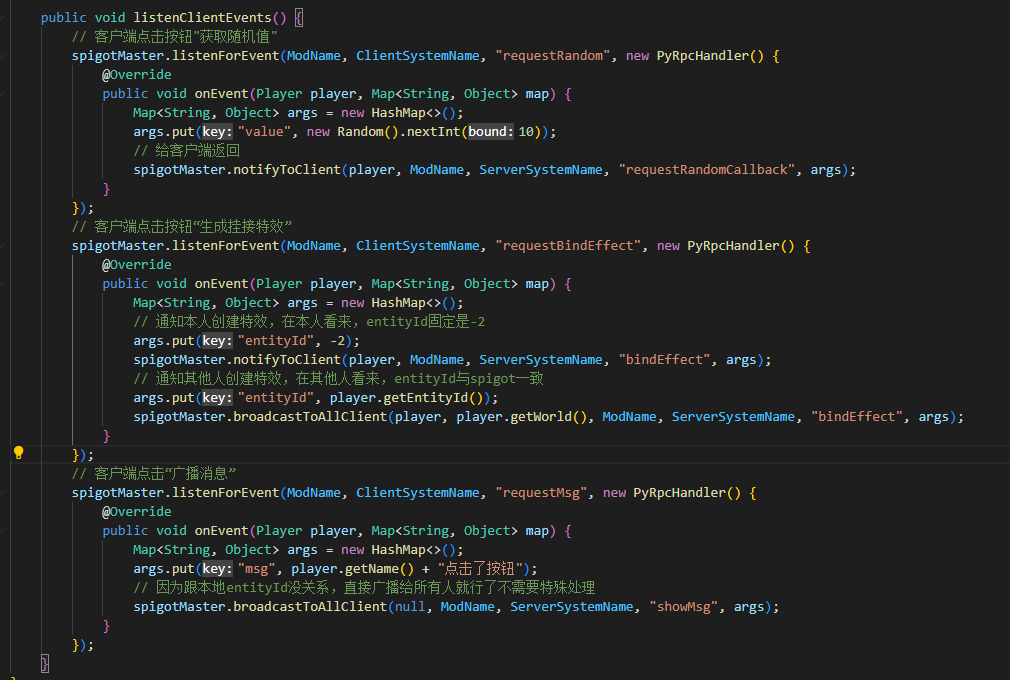
[示例Demo](./99-下载内容.html#示例demo)中的PyRpcDemo包含了客户端mod及spigot插件。
进入游戏后会在右侧显示3个按钮
* 点击“打开窗口”会弹出一个UI,再点击“获取随机数”会从spigot获取一个0-9的随机数并显示在ui上。点击x关闭
* 点击“绑定特效”会通知当前world内所有玩家,给发起玩家替换模型并挂接一个特效
* 点击”广播消息“会在spigot内所有玩家的聊天栏显示一条消息
### 客户端部分
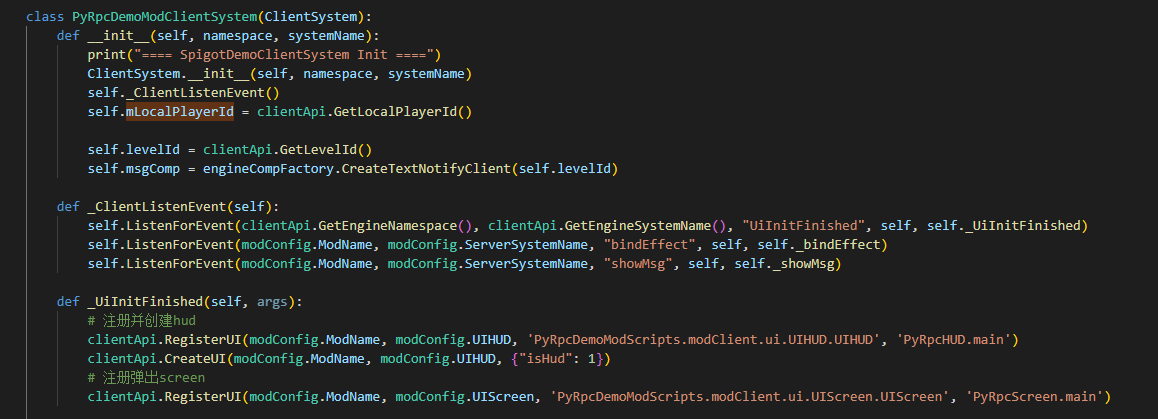
1. 在客户端初始化时注册UiInitFinished事件,并在UiInitFinished事件中创建三个按钮的ui,注册后续将要使用的弹出窗口ui
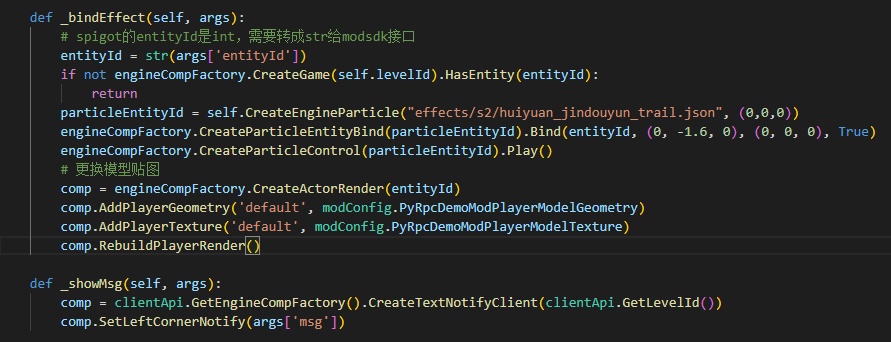
注册两个自定义事件:
- bindEffect:给entityId参数对应实体更换模型以及创建特效
- showMsg:在本地显示聊天栏消息
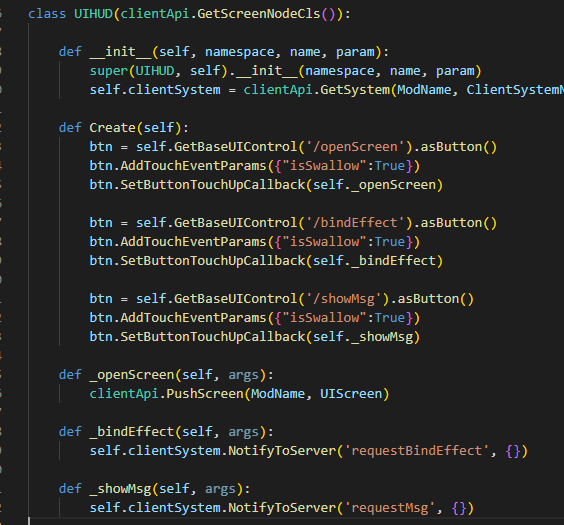
2. 在为三个按钮注册回调函数
”打开窗口“按钮抬起时弹出随机数的ui
”绑定特效“和”广播消息“按钮抬起时给spigot发送自定义消息
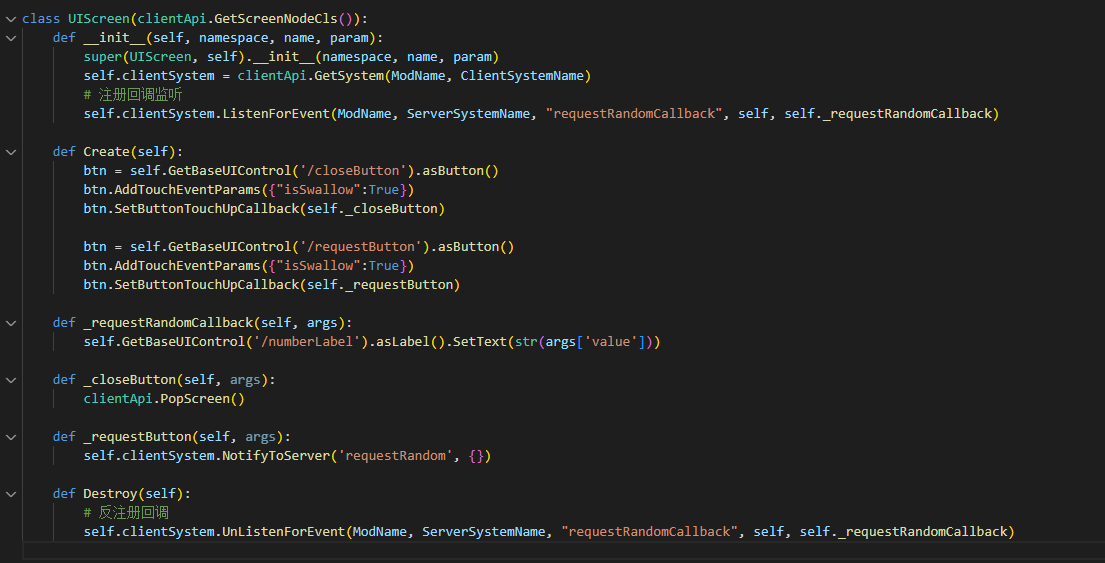
3. 在随机数的ui创建时监听获取随机数的回调事件,将参数中的值显示到label控件上
注册按钮回调:”获取随机数“按钮抬起时向spigot发送一个自定义消息,关闭按钮抬起时弹出界面
界面销毁时反监听获取随机数的回调事件
### spigot部分
- 初始化时注册自定义事件,分别为:
- requestRandom:给玩家返回随机数获取回调
- requestBindEffect:给本人返回-2的entityId,给world内其他人返回spigot的entityId
- requestMsg:给spigot内所有人返回消息